Birthday Cake with Name and Photo Edit
Choose a birthday cake image and personalize its name and photo fields. Preview your cake wish, then generate and download it to share.
Choose your design
243 designs-
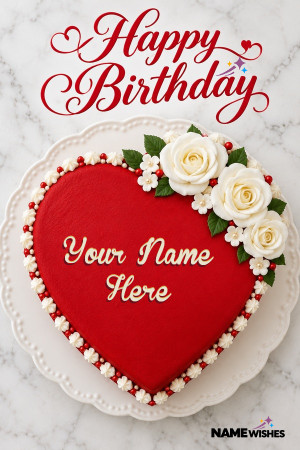 Red Heart Birthday Cake with Name on Icing
-
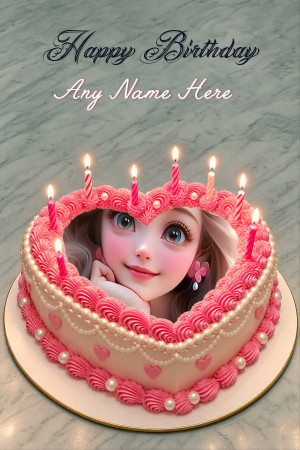 Heart Birthday Cake for Husband or Wife with Name and Photo
-
 Cute Car Theme Birthday Cake For Little Boys
-
 Themed Birthday Cake with Name for Children
-
 Heart Shaped Birthday Cake For Girl Free Online
-
 Rose Gold Birthday Cake Free Download Online
-
 Happy Birthday Rainbow Cake Design For Girls
-
 Fresh Cream Happy Birthday Hearts Cake Free Online
-
 Soft Pastel Happy Birthday Rainbow Cake Online
-
 Layers Birthday Cake Pastel Rainbow colors cake
-
 Spectacular Rainbow Butterfly Birthday Surprise Cake
-
 Love Birthday Cake With Name App to Elevate Celebrations
Featured designs


Related categories


More about these wishes

Create a birthday cake image with a name and photo
A personalized cake image is a simple way to send birthday wishes when you cannot celebrate in person. Choose a design for the recipient, enter their name and add a photo if the template includes a photo field. These are digital greetings, rather than cakes available to order.
Make your cake wish
- Open a cake design that suits the birthday person.
- Complete the fields shown in the editor. For photo designs, use a clear portrait and adjust its position.
- Check the spelling and preview before creating the image.
- Download the finished birthday cake image and send it with your message.
Each design has its own text limits and photo layout. For other styles, explore birthday wishes with name and photo or first birthday cakes.
Choose a cake design that suits the recipient
Start with the person rather than the text you want to fit onto the cake. A playful design can suit a child, while a romantic greeting may be a better choice for a partner. Look at the sample image, the photo area and the lettering before opening the editor. A design with a single portrait space usually works best with one person's picture. If you want to include more people, choose a layout that has room for them instead of squeezing a group into a small frame.
For a baby turning one, try the twinkle-themed first birthday cake. It has a name field and a photo field. For other birthdays, browse the collection and choose a greeting whose editable fields match what you want to add.
Name-only cakes and cakes with a photo
A name-only cake keeps the focus on the birthday message and lettering. It is useful when you do not have a suitable photo or prefer a simpler greeting. A photo-enabled cake adds a portrait to the design, giving the recipient another personal detail to recognize. The sample artwork may contain a picture even when that picture is decorative, so check the visitor fields rather than assuming every visible element can be changed.
Get a better result from your photo
Choose an original, well-lit picture where the face is in focus. Leave a little space around the head so the frame does not cut off hair or the chin. A close group selfie can be difficult to fit into a narrow portrait area. Adjust the position and zoom where those controls are available, then check the whole cake preview before generating the image. Avoid enlarging a small, blurry screenshot if you have a clearer version of the same photo.
Questions about birthday cake greetings
Can I write any name on the cake?
You can personalize the text field shown by the selected template, within its character limit. A shorter name or nickname may fit more comfortably. The preview shows how the lettering looks before you create the greeting.
Does every cake let me upload a photo?
No. Photo uploads are available on templates that show a visitor photo field. Choose a photo-enabled design if including a portrait is important to your greeting.
How do I send the finished cake image?
Generate the image and use Download Image to save it. You can then attach the saved file to a message or upload it to a social post. Add a short birthday note when you send it, so the greeting includes your own words as well as the design.